

Software engineers spend upwards of 8 to 10 hours a day typing code, navigating with a mouse, and using keyboard shortcuts. Over time, these repetitive micro-movements can inflame the tendons passing through the narrow carpal tunnel in your wrist.
When these tendons swell, they compress the median nerve, leading to tingling, numbness, weakness, and pain in the hand and fingers.
Fortunately, incorporating target mobility drills into your daily routine helps keep tendons flexible and prevents median nerve entrapment.
Below are simple wrist and forearm exercises to prevent carpal tunnel that software engineers can perform right at their desks in under five minutes.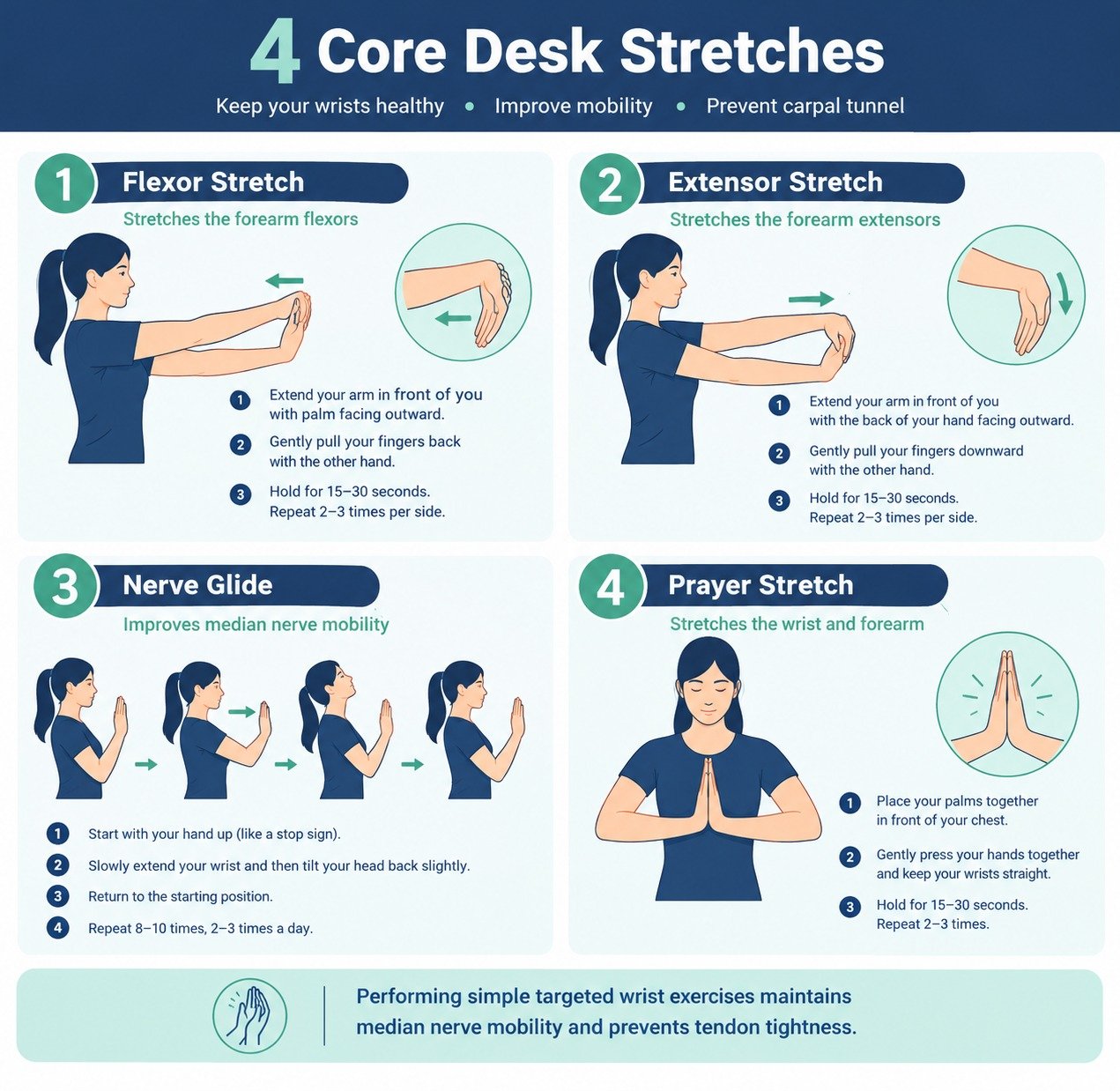
1. Wrist Flexor Stretch
The wrist flexors run along the inside of your forearm and work heavily when pressing keys or gripping a mouse.
-
How to Do It: Extend your right arm straight out in front of you with your palm facing up. Use your left hand to gently pull your right fingers down toward the floor until you feel a comfortable stretch along your inner forearm.
-
Hold Time: Hold for 15 to 30 seconds.
-
Repetitions: Repeat 2 to 3 times per side.
2. Wrist Extensor Stretch
The extensors line the top of your forearm and stay engaged while hovering your hands over a keyboard.
-
How to Do It: Extend your right arm straight out in front of you, this time with your palm facing down. Bend your wrist so your fingers point down toward the floor. Use your left hand to gently pull the back of your right hand toward your body.
-
Hold Time: Hold for 15 to 30 seconds.
-
Repetitions: Repeat 2 to 3 times per side.
3. Median Nerve Gliding Exercise
Nerve glides help the median nerve slide smoothly through the carpal tunnel without getting caught on inflamed surrounding tissue.
-
How to Do It: Make a gentle fist with your thumb resting outside your fingers. Uncurl your fingers so they extend straight up. Bend your wrist back so your palm faces the ceiling. Extend your thumb out to the side. Finally, use your opposite hand to gently pull back on your thumb.
-
Hold Time: Move through each position fluidly, holding each stance for 3 to 5 seconds.
-
Repetitions: Repeat 5 times per hand.
4. Reverse Prayer Stretch
This stretch opens up the underside of the wrist and reduces built-up tension from typing.
-
How to Do It: Place your palms together in front of your chest in a prayer position. Slowly lower your hands toward your waist while keeping your palms pressed firmly together until you feel a gentle pull along your wrists and forearms.
-
Hold Time: Hold for 20 to 30 seconds.
-
Repetitions: Repeat 2 times.
Setting up a comfortable, ergonomic workstation setup detailed in best home office setup for software developers protects your body alongside active mobility drills.
5. Simple Desk Habits for Wrist Longevity
In addition to targeted stretches, small ergonomic adjustments reduce strain on your forearms throughout the day.
-
Keep Wrists Neutral: Avoid resting your wrist bends on hard desk edges while typing. Your hands should hover naturally or rest lightly on a soft palm rest.
-
Take Micro-Breaks: Follow the 50/10 rule. After 50 minutes of continuous typing, step away from your keyboard for 10 minutes to shake out your hands.
-
Lighten Your Keystroke: Typing harder than necessary increases mechanical stress on your finger tendons. Use a light touch on mechanical or laptop keyboards.
Integrating physical mobility into broader daily movement routines like our best home workouts with no equipment keeps your joints supple, while optimizing recovery routines through how to improve sleep quality naturally allows inflamed tissues to heal overnight.
Want More Insights to Grow Your Digital Presence & Daily Productivity?
Whether you need to fix your website’s technical performance or build a smarter, burnout-free work routine, NewsUp To delivers practical guides to keep you ahead.





Leave feedback about this