

Staring at digital displays for 8 to 10 hours a day has become the norm for modern professionals. However, extended screen sessions frequently lead to digital eye strain, also known as computer vision syndrome. Symptoms include dry eyes, blurred vision, tension headaches, and neck stiffness.
When you stare at a monitor, your eye muscles work continuously to maintain focus, while your natural blink rate drops by up to 50%. Over a long workday, this lack of rest causes fatigue in your ciliary muscles and dries out the protective fluid covering your eyes.
Protecting your vision during intense workdays requires combining timed visual breaks with smart display ergonomics.
Below is a practical guide on how to stop digital eye strain during long workdays using the 20-20-20 rule and advanced workspace adjustments.
1. Master the 20-20-20 Rule
The ciliary muscle inside your eye contracts to focus on close objects like monitors and relaxes when viewing distant objects. Staring at a fixed distance for hours causes muscle spasms and fatigue.
-
How It Works: Every 20 minutes, pause your work and focus on an object at least 20 feet away for a full 20 seconds.
-
Why It Works: Looking into the distance allows the ciliary muscle to relax completely, resetting your visual focus mechanism.
-
Implementation Tip: Set a subtle periodic chime on your phone or install a browser reminder extension to build the habit without interrupting your workflow.
2. Optimize Screen Distance and Position
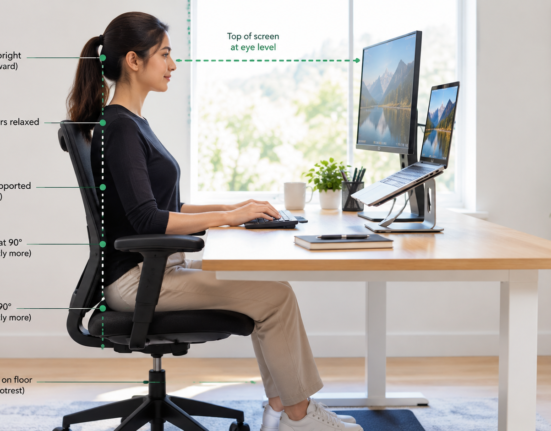
Improper monitor height and distance force your eyes to open wider than necessary, accelerating fluid evaporation and causing neck strain.
-
Set Arm’s Length Distance: Position your monitor roughly 20 to 30 inches (an arm’s length) away from your face.
-
Angle the Screen Downward: The top of your screen should sit at or slightly below eye level. Looking downward at a 15 to 20-degree angle allows your eyelids to cover more of your eyeball surface, reducing moisture loss.
-
Increase Text Size: Avoid squinting by scaling up display font sizes to 125% or 150% in your operating system settings.
Pairing screen position tweaks with ergonomic desk adjustments outlined in best home office setup for software developers creates a healthy, pain-free workstation environment.
3. Manage Ambient Lighting and Screen Glare
Harsh contrast between a bright monitor and a dark room, or direct glare from windows, forces your eyes to work harder to process visual information.
-
Match Room Brightness: Adjust your monitor brightness so it matches the surrounding ambient room light. If your screen looks like a glowing light source, it is too bright.
-
Position Windows Side-to-Side: Place your computer monitor perpendicular to windows rather than directly in front of or behind them to prevent blinding reflection or high contrast.
-
Use Anti-Glare Filters: If working under overhead fluorescent lights, attach a matte anti-glare screen protector to reduce harsh light reflections.
4. Retrain Your Blinking Habits and Hydration
Humans normally blink about 15 to 20 times per minute. When focusing on digital screens, that rate drops to 5 to 7 times per minute, leading to severe surface dryness and irritation.
-
Practice Conscious Blinking: Make a habit of closing your eyes completely for two seconds periodically to redistribute the tear film across your cornea.
-
Use Lubricating Eye Drops: Over-the-counter preservative-free artificial tears help restore moisture during intense afternoon work sessions. Avoid red-eye relief drops, which contract blood vessels and cause rebound irritation.
-
Maintain Room Humidity: Use a small desktop humidifier to keep air moisture levels optimal in air-conditioned or heated offices.
Taking care of your visual health pairs naturally with physical wellness routines; keep your joints comfortable with simple wrist and forearm exercises to prevent carpal tunnel and optimize your nightly recovery using how to improve sleep quality naturally.
Want More Insights to Grow Your Digital Presence & Daily Productivity?
Whether you need to fix your website’s technical performance or build a smarter, burnout-free work routine, NewsUp To delivers practical guides to keep you ahead.




Leave feedback about this