

Whether you are attending lectures on campus, presenting in virtual client meetings, or working from a local coffee shop, having the right laptop directly impacts your productivity. Modern computing requires a machine that balances processing speed, long battery life, sturdy build quality, and easy portability without running hot or loud.
With rapidly changing processor architectures, choosing the best machine can feel overwhelming. This comprehensive buying guide breaks down the best laptops for students and remote professionals, highlighting key specifications and real-world performance factors.
1. Processor (CPU) and Architecture
Traditional x86 processors (Intel and AMD) now face strong competition from ARM-based architectures (Apple Silicon and Snapdragon X Elite). ARM chips offer exceptional battery longevity and near-silent operation. Intel Core Ultra chips feature integrated AI processing (NPUs) and robust application compatibility.
2. Display Quality and Comfort
You will spend hours staring at your screen daily. Prioritize displays with at least Full HD (1080p) or 2.8K resolution, 300+ nits brightness, and anti-glare coatings or vibrant OLED panels.
3. Keyboard and Trackpad Quality
Long essay typing sessions and document formatting require comfortable key travel and tactile feedback. A spacious, precise glass trackpad reduces wrist fatigue over long workdays.
Top Laptop Recommendations Comparison
| Laptop Model | Target User | Standout Feature | Typical Battery Life |
| Apple MacBook Air 13/15 | Creative Students & macOS Users | Silent fanless design, class-leading efficiency | 15–18 Hours |
| Lenovo ThinkPad T14s / Yoga Slim | Business Professionals & Writers | Industry-leading keyboard, durable build | 14–17 Hours |
| ASUS Zenbook 14 OLED | Visual Workers & Value Seekers | Vibrant 3K OLED screen, compact metal chassis | 10–13 Hours |
| Dell XPS 13 | Executives & Minimalist Travelers | Sleek bezel-less design, ultra-compact size | 12–15 Hours |
| HP OmniBook Ultra Flip | Note-Takers & Hybrid Workers | Versatile 2-in-1 convertible touchscreen design | 11–14 Hours |
Detailed Model Reviews
1. Apple MacBook Air: Best Overall for Most Users
The MacBook Air continues to set the benchmark for ultraportable productivity. Combining high processing power with fanless, completely silent operation, it easily handles heavy web browsing, document drafting, photo editing, and video calls without getting hot.
-
Pros: Exceptional battery life, premium aluminum body, great speakers and trackpad.
-
Cons: Limited port selection (requires adapters for USB-A/HDMI), supports limited external monitors.
-
Best For: Students and remote workers who want a reliable, quiet machine that lasts all day on a single charge.
2. Lenovo ThinkPad Series: Best for Typing and Business Reliability
Lenovo’s ThinkPad line (including the ThinkPad T14s and Yoga series) remains legendary among remote professionals for its world-class keyboard comfort and structural durability. Modern models featuring Qualcomm Snapdragon or Intel Core Ultra processors provide incredible endurance and built-in enterprise security features.
-
Pros: Outstanding keyboard feel, strong port selection (HDMI, USB-A, Thunderbolt), rugged durability testing.
-
Cons: Classic functional styling may not appeal to users looking for flashy designs.
-
Best For: Writers, researchers, business analysts, and remote employees who type extensively daily.
3. ASUS Zenbook 14 OLED: Best Value for Screen Quality
If display quality is your primary concern, the ASUS Zenbook 14 OLED offers high-end visuals at a competitive price point. The vivid OLED panel delivers deep contrast, accurate color reproduction, and smooth refresh rates, making reading, graphic work, and video consumption crisp and clear.
-
Pros: Stunning high-resolution OLED screen, solid build, full port array including HDMI.
-
Cons: OLED panels draw slightly more power during high-brightness usage.
-
Best For: Graphic design students, content creators, and remote workers who prioritize screen clarity.
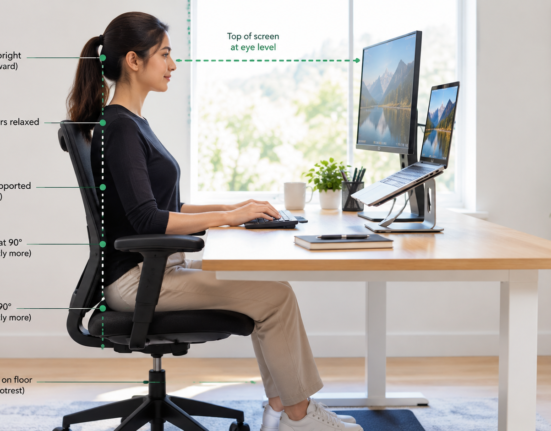
To optimize your daily workspace ergonomics alongside a new machine, read our guide on creating an efficient remote work home office setup guide.
How to Choose Based on Your Field of Study or Career
Different disciplines have distinct hardware requirements:
-
Humanities, Communications, and Business: Focus on keyboard comfort, light weight, and long battery life. Standard integrated graphics are sufficient.
-
Engineering, Computer Science, and Data Science: Require higher processor core counts and at least 16GB to 32GB of RAM for running local code compilations, virtual machines, or CAD software.
-
Digital Media, Architecture, and Video Production: Require dedicated graphics (NVIDIA RTX series) or high-core Apple Silicon chips, alongside color-accurate displays (100% DCI-P3).
Learn how to maintain display clarity and hardware longevity with our practical laptop screen maintenance tips.
Final Purchasing Advice
Investing in a quality laptop is an investment in your daily productivity. Avoid buying base models with only 8GB of RAM, as modern web browsers and productivity suites quickly consume memory, leading to premature slowdowns.
Whenever possible, test key feel and screen brightness in person, buy during seasonal back-to-school or holiday sales, and look for student or corporate discount programs offered directly by manufacturers.
Explore our curated list of top budget productivity tech gear for additional accessories like ergonomic mice, portable monitors, and protective sleeves.
Want More Insights to Grow Your Digital Presence & Daily Productivity?
Whether you need to fix your website’s technical performance or build a smarter, burnout-free work routine, NewsUp To delivers practical guides to keep you ahead.





Leave feedback about this