
For small business owners and lean sales teams, manual lead handling creates an expensive revenue leak. When a prospective client fills out a quote request or contact form on your website, waiting several hours to send a reply often means losing that deal to a faster competitor.
Contacting an inbound prospect within five minutes dramatically increases qualification rates compared to waiting even thirty minutes. Yet small businesses rarely have dedicated sales development reps sitting by an inbox around the clock.
Building a custom AI lead generation workflow closes that response gap completely.
By connecting visual automation platforms with large language model (LLM) APIs, you can capture incoming form submissions, enrich missing company data, score buyer intent against your Ideal Customer Profile (ICP), and send tailored outreach in under 15 seconds.
Here is your complete step-by-step blueprint for building an automated AI lead generation workflow.
What Is a Custom AI Lead Generation Workflow?
A custom AI lead generation workflow is an automated software pipeline that captures, evaluates, and routes incoming sales inquiries without manual data entry. A reliable small business workflow runs through five sequential nodes:
-
Instant Webhook Trigger: Captures raw form or ad lead submissions the moment a prospect clicks submit.
-
Data Standardization & Enrichment: Cleans phone/email formatting and appends firmographic details such as company size or industry.
-
AI Qualification & Scoring: Evaluates the prospect’s project description and budget against your ICP criteria using structured JSON output.
-
Conditional Logic Router: Splits leads into “High-Intent Priority” and “Long-Term Nurture” branches based on the AI fit score.
-
Automated Outreach & CRM Sync: Sends a personalized email with a calendar link to qualified buyers, alerts your team in Slack, and logs the record in your CRM.
Choosing Your AI Lead Workflow Tech Stack
You do not need custom software engineering to build this pipeline. Modern visual integration engines connect directly to form builders, AI models, and CRMs.
| Pipeline Layer | Recommended Tools | Core Function in the Workflow |
| 1. Lead Capture Form | Tally / Typeform / Webflow Forms | Collects contact info, budget tier, and project pain points. |
| 2. Automation Engine | Make / Zapier | Listens for webhooks, parses JSON payloads, and executes conditional branches. |
| 3. AI Reasoning Layer | OpenAI API / Claude API | Scores lead quality, extracts buying intent, and drafts tailored opening lines. |
| 4. CRM & Database | HubSpot / Airtable / Notion | Stores structured lead profiles, fit scores, and campaign attribution sources. |
| 5. Alert & Outreach | Gmail / Outlook / Slack / Twilio | Delivers instant personalized replies and notifies sales reps of hot leads. |
To explore pre-built sales routing templates and enrichment patterns, review the Make AI Sales Automation Solutions and the Zapier Lead Management Automation Guide.
Step-by-Step Workflow Architecture
Step 1: Configure the Instant Webhook Trigger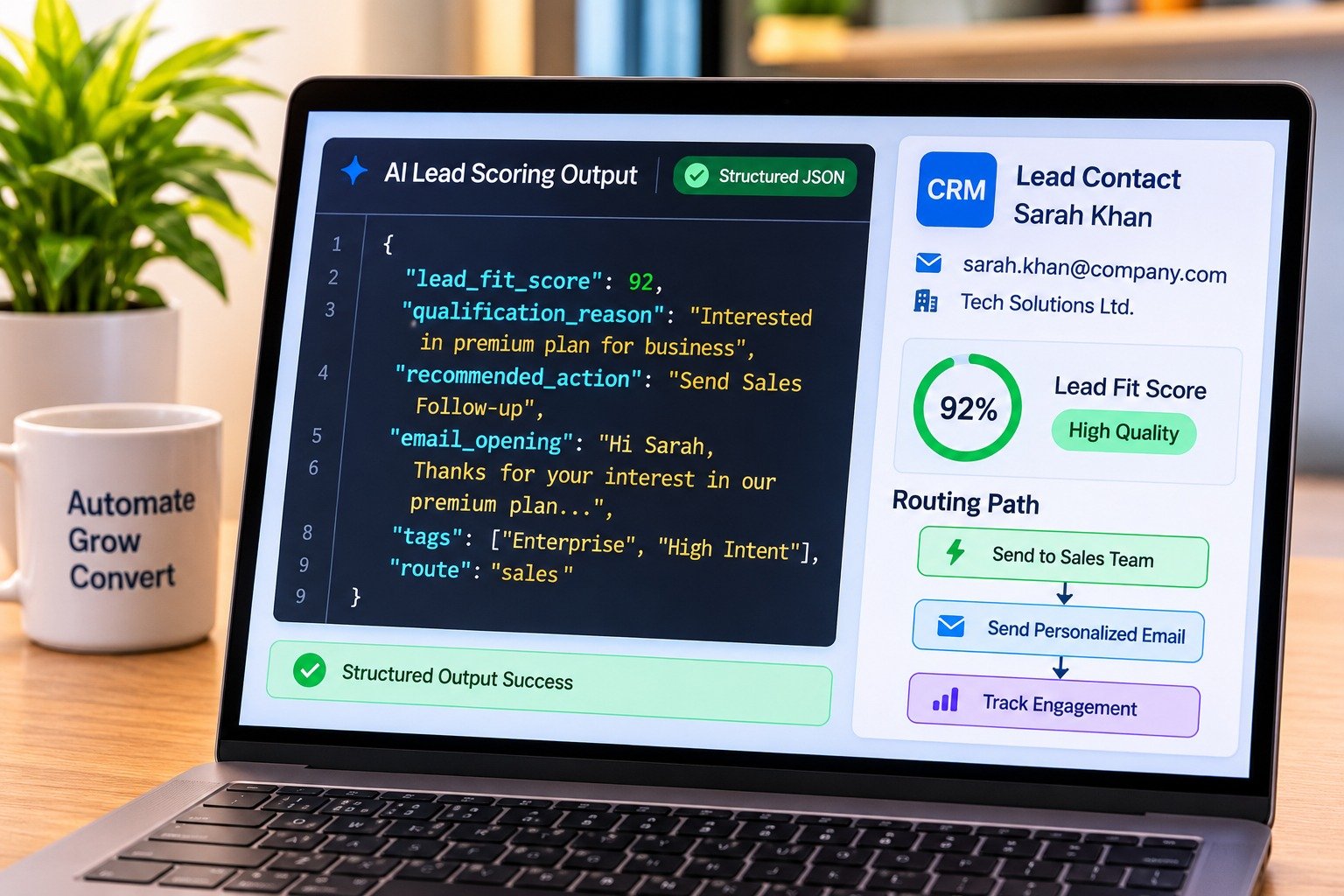
Start by creating a new scenario in Make or a Zap in Zapier and selecting a Custom Webhook as the trigger module. Copy the generated webhook URL and paste it into your website form’s webhook integration settings.
Submit a test entry on your live form so the automation engine captures the exact field structure (name, email, company URL, budget range, and message).
Step 2: Build the AI Lead Scoring Prompt with Structured Outputs
Add an AI text generation module immediately after your webhook trigger. Rather than letting the AI return unpredictable paragraphs, enforce a strict JSON schema so downstream modules can read individual fields reliably.
Review schema enforcement best practices in the OpenAI API Structured Outputs Documentation to ensure your automation parser never breaks on malformed text.
Step 3: Set Up Conditional Routing Rules
Insert a Router (Make) or Paths (Zapier) module right after the AI step to separate serious buyers from early-stage browsers:
-
Branch A: High-Fit Leads (fit_score greater than or equal to 8)
-
CRM Action: Create a high-priority deal record in HubSpot, Airtable, or Notion with the AI’s
qualification_reasonattached to the contact notes. -
Email Action: Send an immediate plain-text email from your sales inbox combining the AI-generated
custom_openingwith your direct calendar booking link. -
Team Alert: Post a formatted summary in your
#sales-leadsSlack channel so a human rep can review the thread and follow up personally.
-
-
Branch B: Low-Fit or Early-Stage Leads (fit_score less than 8)
-
CRM Action: Create a standard contact record tagged as “Nurture” alongside the original marketing campaign source.
-
Sequence Action: Enroll the contact into an automated educational email sequence rather than booking live sales calendar slots.
-
If you want to apply this exact automation architecture to a specific industry vertical, see our step-by-step guide on how to build a white label ai lead nurturing system for real estate.
Step 4: Add Safeguards and Error Handling
Automated outreach can damage your brand reputation if an integration fails or an AI model misinterprets vague user input. Put three operational guardrails in place before turning your workflow on:
-
Human Approval for Custom Quotes: Never allow an AI node to promise custom pricing, legal guarantees, or contract terms automatically. Keep AI outreach focused on acknowledging the inquiry and booking a discovery call.
-
Automatic Sequence Pause on Reply: Configure your email and CRM triggers so that the moment a prospect replies to an automated message or books a calendar slot, all scheduled follow-up drips pause immediately.
-
Fallback Error Storage: Attach an error-handling branch to your AI module. If an API rate limit or network timeout occurs, route the raw webhook payload into a backup Google Sheet or Airtable base and alert your admin email so zero leads are lost.
For organizing your incoming client records and operational SOPs once deals close, read our guide on how to build sell notion systems small business operations.
Want More Insights to Grow Your Digital Presence & Daily Productivity?
Whether you need to fix your website’s technical performance or build a smarter, burnout-free work routine, NewsUp To delivers practical guides to keep you ahead.




Leave feedback about this