
How to Backup Crypto Seed Phrase Safely: Complete Offline Security Guide
In cryptocurrency self-custody, your 12-word or 24-word recovery phrase (also called a seed phrase) is the master cryptographic key to your entire portfolio. If your hardware wallet is lost, broken, or stolen, entering those exact words in order into a compatible wallet restores full access to your funds.
Conversely, anyone who discovers your seed phrase can drain your wallet instantly from anywhere in the world, with zero chance of reversing the transaction. Because there is no customer support desk or “forgot password” button in decentralized finance, securing your backup is the single most critical responsibility in crypto ownership.
Here is your step-by-step guide to backing up your crypto seed phrase safely and permanently.
What Is the Safest Way to Backup a Seed Phrase?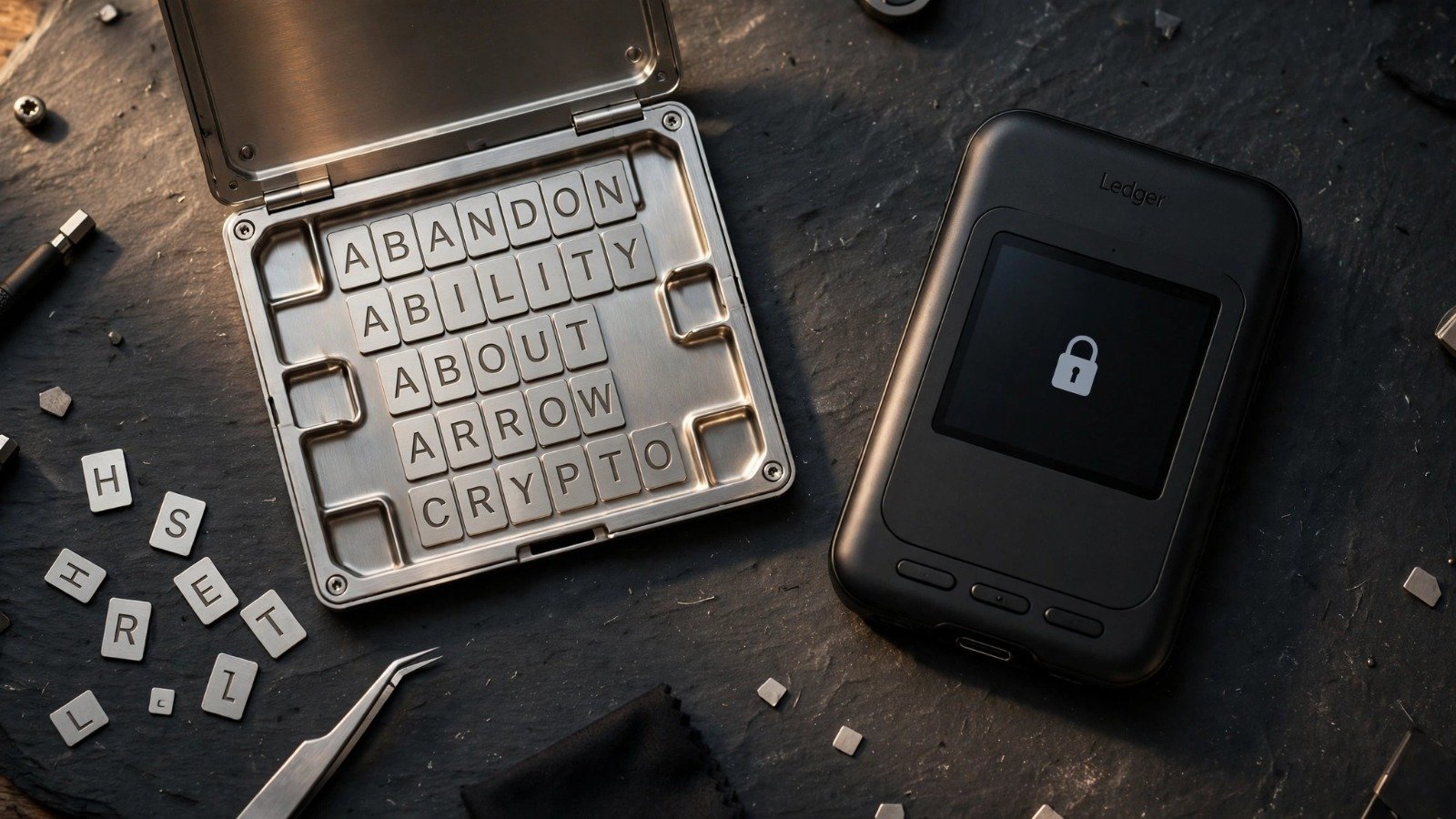
To protect your crypto recovery phrase from both hackers and physical disasters, follow four non-negotiable security rules:
-
Keep It 100% Offline: Never take a screenshot, snap a photo, type it into a notes app, or store it in cloud storage or a password manager.
-
Upgrade from Paper to Metal: Stamp or engrave your words onto marine-grade stainless steel or titanium plates so your backup survives house fires, floods, and corrosion.
-
Use the First-Four-Letter BIP-39 Rule: Because the standard BIP-39 wordlist identifies every word uniquely by its first four letters, you only need to stamp the first four characters of each word.
-
Create Two Geographically Separate Copies: Store two independent offline backups in separate secure locations, and always perform a test recovery before transferring major funds.
Comparing Crypto Seed Phrase Storage Methods
Choosing the right physical medium determines whether your backup survives five decades or vanishes during a single household emergency.
| Storage Medium | Fire Resistance | Water & Corrosion Resistance | Hack & Malware Protection | Best Use Case |
| Digital File / Cloud Photo | None (Device dependent) | None (Device dependent) | Critical Risk (Exposed to malware & cloud leaks) | Never Use for real funds. |
| Standard Pen & Paper | Low (Burns around 450°F / 230°C) | Low (Ink smears; paper turns to pulp) | High (Completely offline) | Temporary setup or small spending wallets. |
| Marine-Grade Stainless Steel (Billfodl / Cryptosteel) | High (Withstands up to 1,350°C to 1,400°C) | High (Rust-proof and waterproof) | High (Completely offline) | Best Overall Value for long-term portfolios. |
| Aerospace Titanium Plate (Cryptotag Zeus) | Extreme (Withstands up to 1,665°C / 3,000°F) | Extreme (Virtually indestructible) | High (Completely offline) | High-net-worth cold storage and multi-decade holds. |
Independent stress tests conducted by security researcher Jameson Lopp’s Metal Bitcoin Storage Reviews demonstrate that stamped titanium and thick stainless steel plates survive extreme heat, acid exposure, and crushing forces that destroy paper and consumer electronics.
Step 1: Eliminate All Digital Exposure Traps
Most cryptocurrency thefts do not happen through sophisticated cryptographic attacks; they happen because users accidentally expose their seed phrase to an internet-connected device.
Digital Habits to Avoid Immediately
-
Smartphone Camera Rolls: Taking a quick photo of your recovery card automatically syncs the image to iCloud, Google Photos, or device backups. One compromised email password gives attackers instant access to your photo library.
-
Password Managers and Cloud Notes: Storing recovery words inside Apple Notes, Notion, Google Docs, or cloud-synced password vaults turns an offline hardware wallet into a vulnerable hot wallet.
-
Fake Support Portals: Official wallet providers will never ask you to type your seed phrase into a website to “verify,” “sync,” or “unlock” your wallet. Only enter your words directly onto the physical screen of a trusted hardware device during recovery.
Review official security protocols directly through Ledger Academy’s Recovery Phrase Guide to ensure your initial setup stays completely air-gapped.
Step 2: Record Your Words on Durable Metal
When generating a new wallet, write the words down on the included paper card first using a ballpoint pen, numbering each line clearly from 1 to 12 or 1 to 24. Once verified, transfer the phrase onto a dedicated metal backup device.
Popular Metal Backup Formats
-
Letter-Tile Cassettes & Capsules (e.g., Billfodl, Cryptosteel Capsule): You slide pre-engraved stainless steel letter tiles into secure channels or onto a threaded steel rod. No hammering is required, and mistakes are easy to fix during setup.
-
Center-Punch Plates (e.g., Cryptotag Zeus, BitBox SteelWallet): You use a spring-loaded center punch or hammer to permanently indent dots or letters into thick titanium or steel sheets. Punching takes slightly more effort, but individual letters cannot shift or fall out even if the plate is dropped.
Step 3: Add a Passphrase (The “25th Word”) for Extra Defense
If a burglar finds your metal backup plate in your home, a standard 12-word or 24-word seed phrase gives them full access to your coins. Adding an optional BIP-39 Passphrase (often called a 25th word) eliminates single-point-of-failure physical theft.
-
How It Works: A passphrase is a custom word or string of characters you create that combines with your 24-word seed phrase to generate a completely separate hidden wallet.
-
Storage Separation: Store your metal seed phrase plate in one physical location and keep your passphrase memorized or recorded separately in another secure location. Without both pieces, neither backup can unlock your primary funds.
For detailed instructions on configuring passphrases safely without locking yourself out, consult the Trezor Recovery Seed Documentation.
Step 4: Test Your Backup and Distribute Redundant Copies
Never trust an untested backup with significant savings. Before transferring large balances to a new wallet, verify that your recorded words actually restore the exact same wallet address.
-
Send a Small Test Amount: Deposit $10 worth of crypto into your new wallet address.
-
Wipe and Restore: Reset your hardware wallet (or use a secondary spare device) and enter the seed phrase directly from your finished metal plate.
-
Confirm Address Match: Verify that the restored wallet displays your exact public receiving address and the $10 test balance.
-
Store Two Copies in Separate Locations: Keep one metal plate hidden in a fireproof home safe and place a second identical metal copy at a trusted family member’s residence or bank safe deposit box in another area.
If you manage sensitive digital assets and local backups at home, explore our beginners guide home media storage server homelab to learn how air-gapped local infrastructure differs from cloud storage.
For broader financial planning around liquid reserves versus long-term assets, read our comparison of high-yield savings accounts vs short-term treasury bills and debt payoff strategies freelancers variable income.
Want More Insights to Grow Your Digital Presence & Daily Productivity?
Whether you need to fix your website’s technical performance or build a smarter, burnout-free work routine, NewsUpTo delivers practical guides to keep you ahead.




Leave feedback about this