

Creating clear, professional invoices is a fundamental part of running a healthy small business. An invoice is not just a request for payment; it is an official record of services delivered, goods sold, and money owed.
Sending incomplete or confusing invoices often leads to payment delays, communication errors, and unnecessary cash flow stress. By establishing a standardized invoicing process, you can ensure your business gets paid accurately and on time while maintaining professional relationships with your clients.
Below is a complete, step-by-step guide explaining how to make an invoice for small business, along with essential tips to speed up payments.
1. Essential Elements Every Small Business Invoice Needs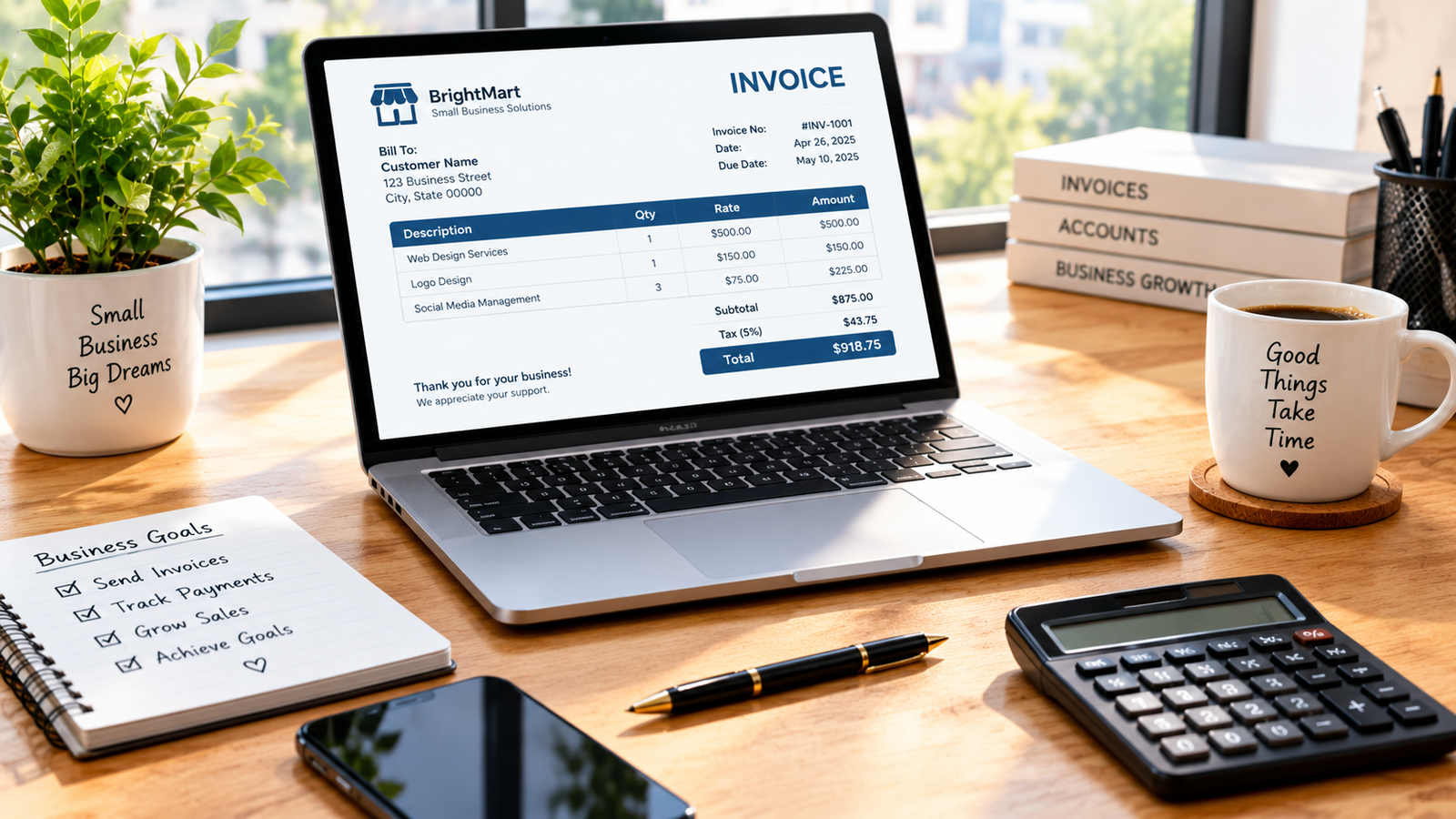
To ensure your invoice is legally clear and easy for your client’s accounting team to process, every document should contain these core components:
-
Header and Business Branding: Place your company name, logo, business address, phone number, and email address prominently at the top.
-
Client Information: Clearly state the client’s business name, contact person, billing address, and email address.
-
Invoice Identification Number: Assign a unique sequential number (for example, INV-001, INV-002) to make tracking and tax accounting effortless.
-
Key Dates: Include both the invoice date (the day the document is issued) and the due date (the deadline for payment).
-
Itemized List of Goods or Services: Provide a line-by-line breakdown describing what was provided, including quantities, hourly rates, unit prices, and subtotal figures.
-
Total Balance Due: Highlight the final calculated amount, including any applicable taxes, discounts, or shipping fees.
2. Choosing Clear Payment Terms
Establishing clear payment terms up front prevents misunderstandings regarding when and how a bill should be settled.
[ Net 15 ] = Payment due in 15 days
[ Net 30 ] = Payment due in 30 days
[ Due upon Receipt ] = Payment required immediately
-
Standard Payment Windows: The most common business terms are Net 30 (payment due 30 days after the invoice date) or Net 15.
-
Accepted Payment Methods: List all acceptable ways to pay, such as direct bank transfers, credit cards, online payment portals, or checks.
-
Late Fee Policies: Briefly outline any late payment penalties (for example, a 1.5% monthly late fee for overdue balances) to encourage timely processing.
When payment disputes or non-responsive clients arise, applying communication techniques from how to handle difficult customers can help resolve billing issues professionally.
3. Step-by-Step Process: How to Create and Send Your Invoice
Follow this practical workflow every time you complete a project or sell products:
| Step | Action | Description |
| 1 | Select a Format | Use a spreadsheet, word processor, or dedicated accounting software. |
| 2 | Fill Out Information | Enter business details, client info, and assign a unique invoice number. |
| 3 | Itemize Services | List delivered work clearly so the client understands every charge. |
| 4 | Add Terms & Total | State the total amount due, accepted payment methods, and due date. |
| 5 | Review and Send | Export as a PDF and email it directly to the client’s accounting department. |
Integrating standard billing practices is crucial whether you operate locally or run broader marketing campaigns, as explored in what is local SEO for small business and b2b vs b2c marketing differences.
4. Smart Tips to Get Paid Faster
-
Send Invoices Promptly: Issue invoices immediately upon project completion while the value of your work is fresh in the client’s mind.
-
Send Invoices to the Right Person: Verify whether your invoice should go to your primary point of contact or directly to an accounts payable department.
-
Set Up Automated Reminders: Send polite friendly email reminders three days before the due date and on the date the invoice becomes overdue.
Want More Insights to Grow Your Digital Presence & Daily Productivity?
Whether you need to fix your website’s technical performance or build a smarter, burnout-free work routine, NewsUpTo delivers practical guides to keep you ahead.




Leave feedback about this