

Working from home in a small apartment or rented room often comes with distinct challenges. You balance limited floor space, tight budgets, and strict lease agreements that prohibit drilling holes into walls.
Trying to work an eight-hour shift from a dining chair or sofa inevitably leads to back stiffness, neck strain, and low productivity. However, turning a tiny alcove, studio corner, or bedroom nook into a high-performance workspace does not require a dedicated spare room or expensive executive furniture.
By selecting compact, multi-functional, and non-damaging ergonomic gear, you can build a posture-aligned home office that fits tight quarters and packs up easily when moving day arrives.
Here is your complete guide to the best budget ergonomic workstation gear for renters and small spaces.
Essential Small-Space Ergonomic Setup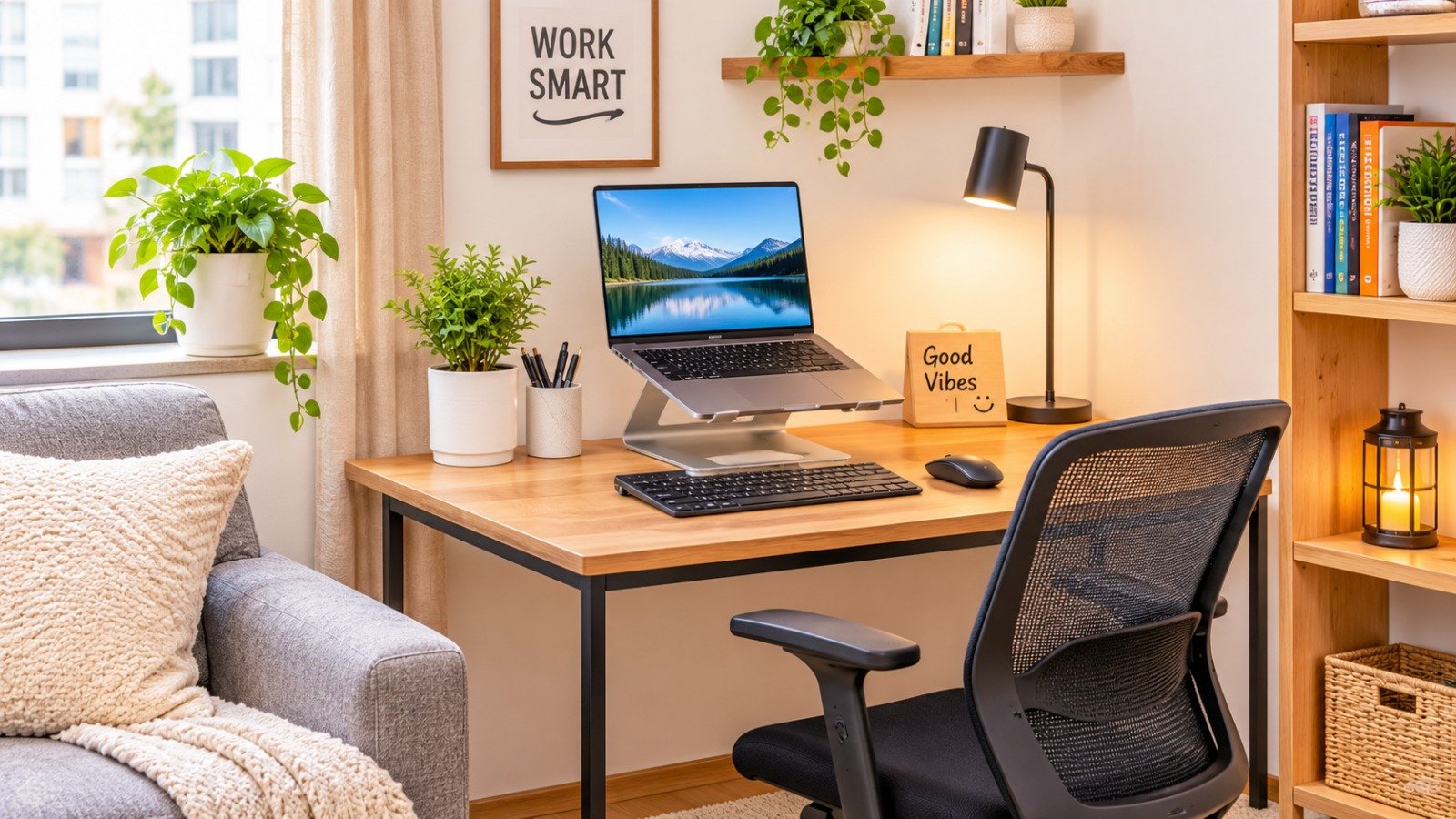
To turn a tiny apartment corner into an ergonomic workstation without losing floor space or damaging rental walls, invest in these five core pieces:
-
Compact Floating or Slim Desk (36″ to 42″ wide): Fits tight nooks while providing adequate surface depth for a laptop and mouse.
-
Slim-Profile Mesh Task Chair: Delivers essential lumbar support and height adjustment while sliding fully under your desk when off the clock.
-
Folding Laptop Stand + External Keyboard: Raises your laptop screen to eye level, eliminating neck tilt without requiring a bulky second monitor.
-
Under-Desk Cable Tray or Clamp-On Storage: Hides messy power cords off the floor to keep your living space visually clean.
-
Ergonomic Memory Foam Footrest: Keeps your feet flat and hips aligned when working at fixed-height dining or desk tables.
The Golden Rules of Renter-Friendly Ergonomics
Setting up a workstation in a rental property requires balancing body mechanics with space efficiency:
-
Zero Permanent Modifications: Avoid wall-mounted shelving that requires drilling heavy anchors. Stick to clamp-on accessories, tension-rod mounts, or adhesive strips.
-
Maintain the “Tuck-Away” Footprint: Choose furniture that disappears when the workday ends. Your chair should slide completely beneath the desk to keep walkway paths clear.
-
Prioritize Eye-Level Alignment: Your monitor or laptop screen top should align with your natural eye level. Tilting your head down 30 degrees places over 30 pounds of extra force on your cervical spine.
Compact Ergonomic Gear Breakdown
| Gear Category | Best Small-Space Solution | Key Renter Benefit | Typical Price Range |
| Desk | Compact Standing Desk Converter / Slim Fixed Desk | Fits in 40-inch wide nooks; zero wall mounting needed | $40 – $120 |
| Seating | Armless or Flip-Arm Mesh Task Chair | Slides all the way under the desk to save walkway space | $60 – $130 |
| Screen Support | Collapsible Aluminum Laptop Stand | Weighs under 1 lb, folds flat, elevates screen to eye level | $15 – $35 |
| Input Gear | Compact Wireless Keyboard & Vertical Mouse | Reduces wrist strain; keeps desk surface clutter-free | $25 – $50 |
| Foot Support | High-Density Foam Teardrop Footrest | Elevates feet to fix knee angles on fixed-height desks | $15 – $30 |
1. Space-Saving Desks for Tight Apartments
When selecting a desk for a studio apartment or bedroom corner, footprint and depth matter far more than total surface width.
Compact Fixed Desks (36″ to 42″ Width)
A narrow desk with a depth of 18 to 22 inches fits easily against a living room wall or behind a couch without blocking foot traffic. Look for minimalist metal-leg designs with open frames, which create visual airiness so the room does not feel overcrowded.
Desktop Standing Converters
If you want the health benefits of alternating between sitting and standing, skip massive motorized standing desks. A compact tabletop standing converter sits directly on your existing desk or dining table. It raises and lowers vertically within its own footprint rather than extending outward into the room.
2. Slim-Profile Ergonomic Seating
Big executive leather chairs destroy apartment space and trap heat during long work sessions.
Mesh Task Chairs with Flip-Up Armrests
A mid-back mesh task chair offers breathable lumbar support while keeping a narrow profile. Choose models featuring flip-up armrests or armless designs. When you finish working, flip the arms up and push the chair completely under the desk surface, freeing up several square feet of living space.
3. High-Yield, Low-Cost Ergonomic Accessories
Achieving ideal posture alignment relies heavily on inexpensive accessories that elevate your gear.
Adjustable Laptop Stands
Working directly on a laptop flat on a desk causes severe neck hunching. An aluminum folding laptop stand lifts the screen 6 to 9 inches off the desk. Pair the stand with an inexpensive external wireless keyboard and ergonomic mouse to keep your shoulders relaxed and elbows bent at a healthy 90-degree angle.
Non-Damaging Clamp-On Monitor Arms
If you use an external monitor, avoid bulky stock plastic monitor stands that consume valuable desk depth. A C-clamp monitor arm attaches directly to the back edge of your desk without screws or drills, elevating the screen while freeing up the entire desk surface below it.
Under-Desk Footrests
If your desk height is non-adjustable, your feet might dangle or press uncomfortably against the floor, straining your lower back. An inexpensive teardrop-shaped foam footrest promotes proper spinal alignment and healthy blood circulation during long desk sessions.
Discover how to streamline your automated work routines by exploring our guide on how to build a no-code workflow.
4. Renter-Friendly Cable Management and Decluttering
Visual clutter in a small apartment creates mental distraction and makes a living area feel cramped.
-
No-Drill Cable Trays: Attach a clamp-on cable management basket to the back of your desk. Route your surge protector and laptop power bricks inside the basket so zero wires dangle on the carpet or floor.
-
Adhesive Cable Clips: Use removable adhesive cable guides along desk legs to keep charging cords tucked neatly out of sight.
-
Rolling Storage Carts: Use a narrow 3-tier metal rolling cart for notebooks, headphones, and office supplies. At the end of the day, roll the cart into a closet or behind a door to keep work items out of sight.
Boost your remote work productivity further using our curated list of the top ai tools for automating daily workflows.
If you frequently travel or work remotely from cafés, check out our security breakdown of digital privacy tools for travelers.
Want More Insights to Grow Your Digital Presence & Daily Productivity?
Whether you need to fix your website’s technical performance or build a smarter, burnout-free work routine, NewsUp To delivers practical guides to keep you ahead.



Leave feedback about this